When you add a serial question to the questionnaire, link it to the elements of your template that should repeat as often as the serial question determines.
Link a serial
Serializing works like setting a rule: click the element, then - instead of Rules - click the ⋯ (three dots) next to it and choose Serial. The serial questions you can link appear in purple; click the right one.
To delete the link, click the turquoise ⋯ to the right of the serialized element → Serial, then click the serial question shown in red.
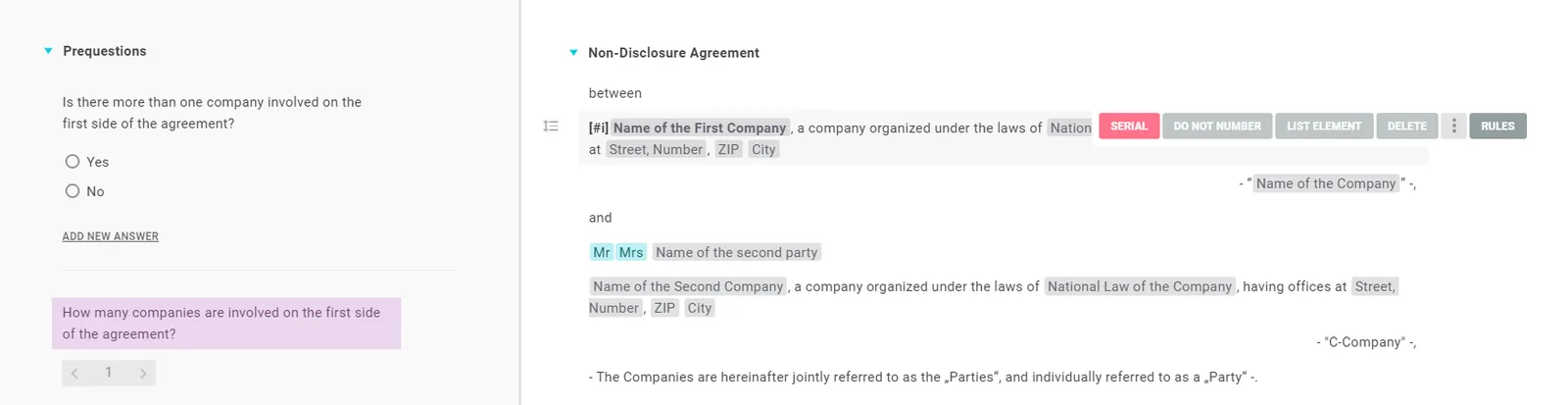
Note: A serialized element is recognizable because its three dots appear turquoise rather than grey when you click it.
Number the repetitions
At the position where you want consecutive numbering, use the command [#i] - both in the questionnaire and on the text page:
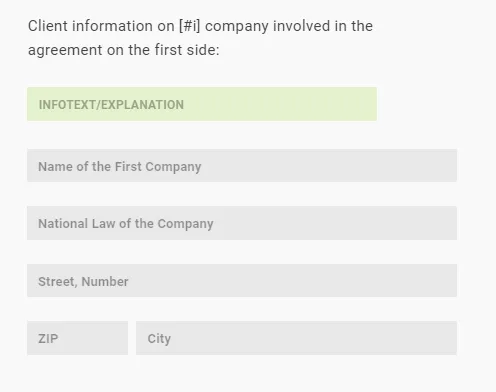

Other variants: [#i,] → “1,”; [#i;] → “1;”; [#i)] → “1)”; [#i ] → “1 ”.
Good to know
- No serial within a serial: if you try to add another serial question inside a serialized section (or serialize a section that already contains one), Lawlift shows an error - so you can’t accidentally create an invalid structure.