Some tasks are handled better by a specialized Add-in tool than by the general chat. When the Assistant detects such an intent, it shows a Recommended Tool card instead of an answer and points you straight to the right tool.
Step by step
-
Describe what you need in the chat as usual - for example, “translate this document into English” or “anonymize all the names”.
-
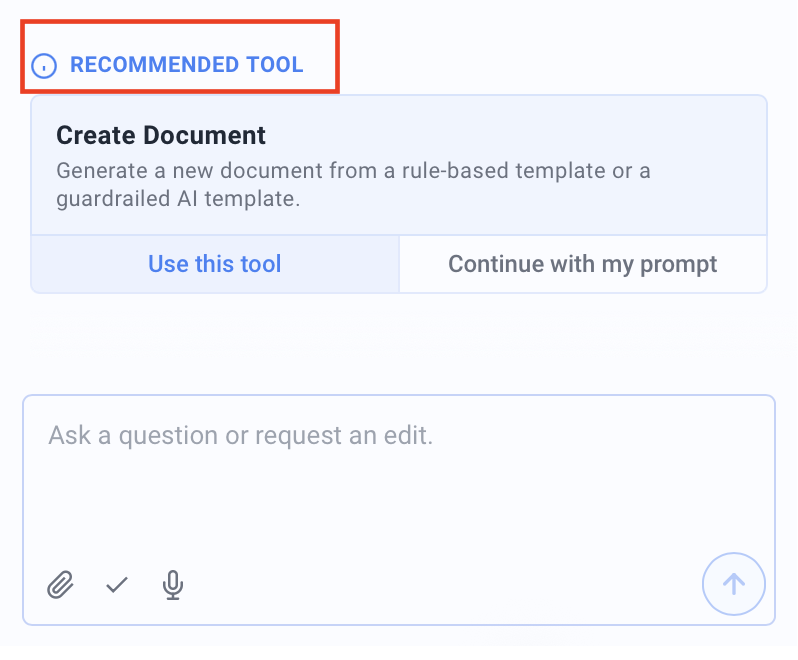
If a dedicated tool fits better, a Recommended Tool card appears with the name and a short description of the suggested tool.
-
Click Use this tool to open it, or Continue with my prompt if you would rather stay in the chat.
Good to know
- Suggested tools: Recommendations include Create Document, Redraft Document, Translate Document, Anonymize / Redact, Document Tests, Create Summary, Templating and Preferences - the same features found on the Draft, Edit and Review tabs.
- The choice stays yours: The suggestion is optional. Use Continue with my prompt to have the Assistant handle your original request directly in the chat instead.